- ANNOUNCEMENTS
- AGENTIC
- ENGINEERING
ParticleDB: A Database Built for AI Agents
 Nikhil Kala Software Engineer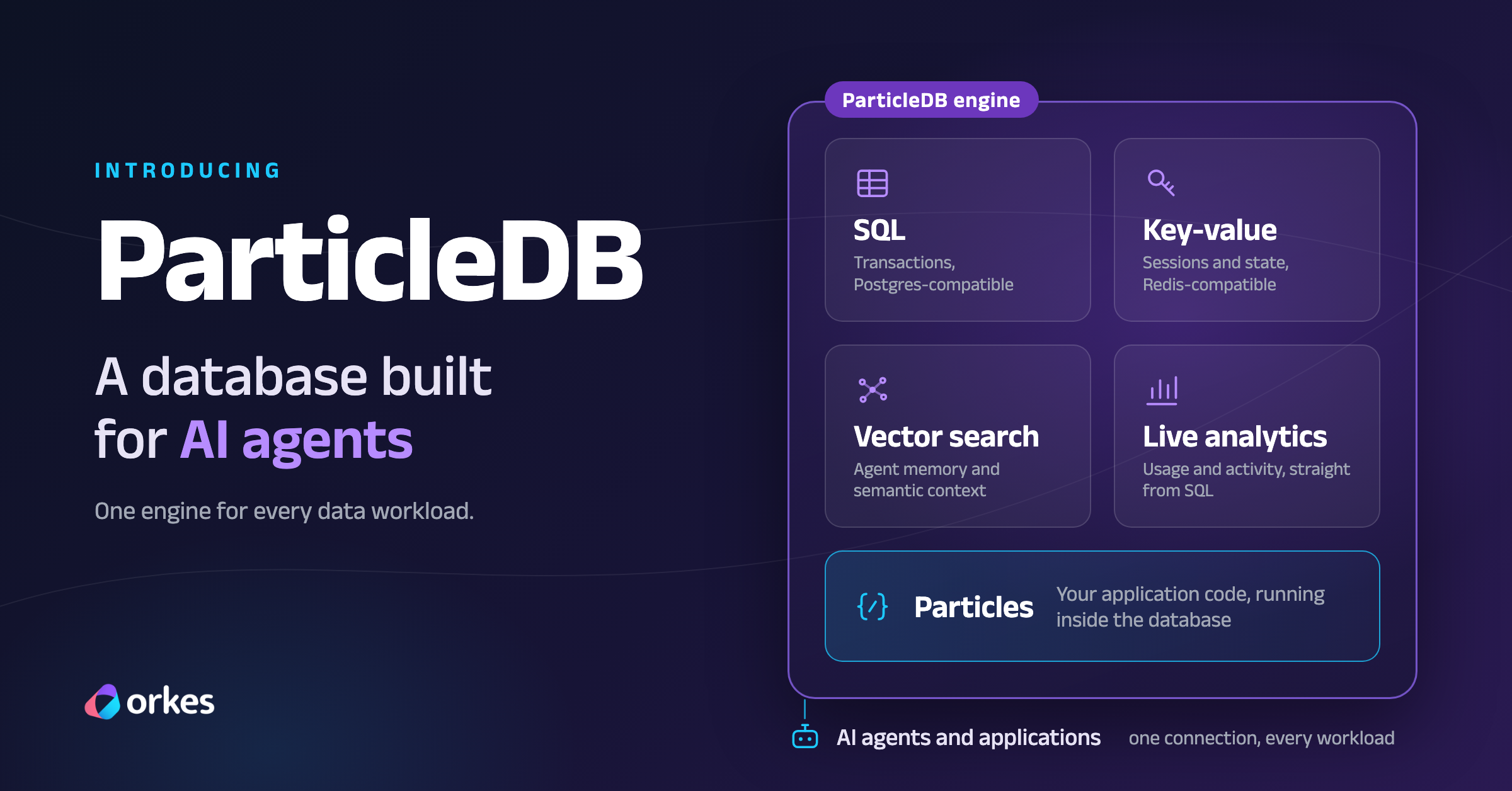
ParticleDB is a database for AI agents and applications, combining transactional SQL, a key-value store, vector search, live analytics, and user-defined code (Particles) in a single engine.
Built from the ground up in Rust, ParticleDB is a complete engine with its own storage, query processing, and transaction management. It is not a layer over other databases: every workload runs in one engine designed for performance and programmability, so you don’t need a separate database for each one.
Why ParticleDB?
Today, application data typically lives across several kinds of databases. PostgreSQL handles transactional data, Redis provides fast key-value access, analytical databases like ClickHouse support reporting and complex queries, and vector databases like Pinecone power semantic search. Each database is optimized for a particular workload, and a typical application might rely on all four to manage customer information, caching, analytics, and search.
Combining these systems means operating multiple databases, synchronizing data between them, and maintaining additional infrastructure and application logic.
For AI agents, this challenge becomes even more significant. An agent is only as good as the data it can access. Even a single decision may require up-to-date transactional state, fast key-value lookups, relevant semantic context, and analytical insights. When that information lives across multiple systems, agents must deal with additional latency and synchronization delays. Worse, agents may end up acting on stale or inconsistent data.
ParticleDB brings these capabilities together in one engine, allowing developers to build applications and agents without managing a separate database for every kind of data operation.
Built for speed and programmability
ParticleDB is designed to handle transactional workloads and analytical queries within the same database. Applications can store and update records, execute transactions, and analyze operational data without maintaining separate copies across different database systems.
Beyond traditional database operations, ParticleDB brings application logic closer to the data through Particles, user-defined functions that execute directly inside the database. Developers can run custom calculations and transformations without repeatedly retrieving data, processing it in an application, and writing the results back.
ParticleDB supports Python Particles today, with additional runtimes planned.
Get started with ParticleDB
It only takes a few steps to install ParticleDB locally and start exploring its capabilities.
1. Install ParticleDB
On macOS or Linux, run:
curl -fsSL https://get.particledb.ai | bashVerify the installation:
particledb --version2. Start the database
Start a local ParticleDB database server:
particledb start --no-auth --data-dir ./pdb-dataThis launches a standalone database server with its own storage, query processing, and transaction management. Data is persisted in ./pdb-data, and applications can connect using SQL, key-value, or native APIs.
The --no-auth flag should only be used for local development in a trusted, network-restricted environment.
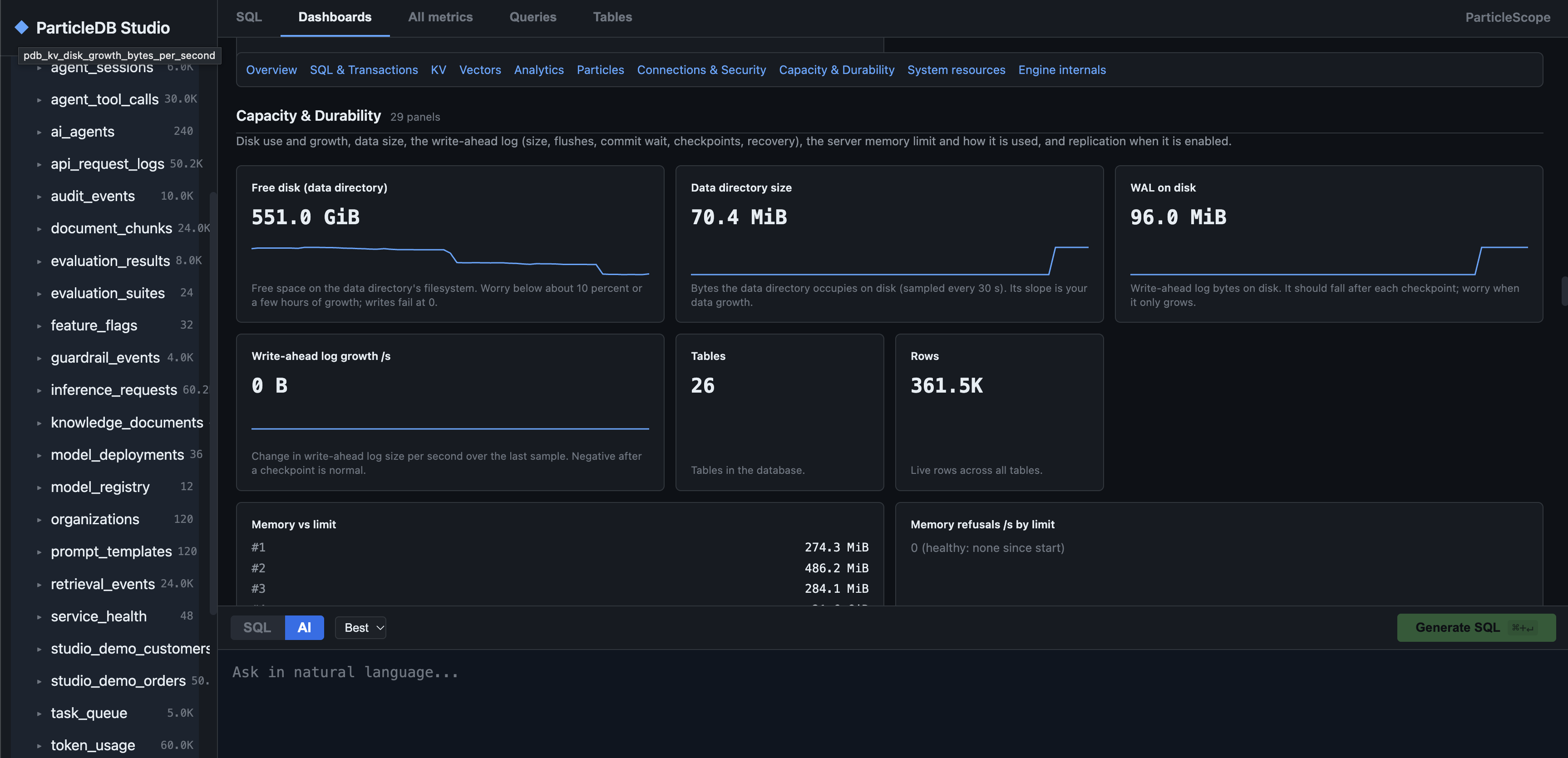
Once ParticleDB is running, you can explore ParticleDB Studio, available on the default web console port 7174. Studio provides built-in dashboards for SQL transactions, key-value operations, vector search, analytics, system resources, and database health.
For more details, see the ParticleDB Studio and Ports documentation.
3. Explore ParticleDB
From there, you can explore its capabilities through SQL, key-value operations, vector search, analytics, and native APIs, all within a single database engine.
For example, you can write data using Redis-compatible commands and read the same data directly through SQL:
$ redis-cli SET agent:status runningOK
$ particledb cli -h localhost -p 7173 -U postgres \  -c "SELECT KV_GET('agent:status') AS status;" status--------- running(1 row)
Same data, multiple interfaces, one database.
For detailed instructions and examples, refer to:
- ParticleDB Quickstart for installation and setup.
- ParticleDB Documentation for SQL, key-value operations, vector search, and other features.
Build with the languages and tools you already use
Applications can connect directly to ParticleDB using familiar database protocols and APIs. PostgreSQL-compatible clients provide SQL access, Redis-compatible clients support key-value operations, and native HTTP and gRPC APIs offer additional ways to interact with the same database.
ParticleDB also offers SDKs for Python, TypeScript/Node.js, Java, Go, and Rust, along with a JDBC driver. This allows developers to integrate ParticleDB into existing applications without adopting an entirely new development stack.
For integration guides and examples, see the ParticleDB SDKs and Language Clients.
ParticleDB in action
Consider an AI agent handling customer support requests. It needs to store customer information and request history, retrieve relevant documentation, track execution state, and analyze outcomes.
ParticleDB supports these operations within a single database engine. Applications can store transactional records in SQL tables, retrieve context through vector search, manage state with key-value operations, and analyze activity using SQL.
Let’s look at a few examples of these capabilities, starting with Particles.
1. Particles: bring your code to the database
Particles let developers execute custom Python functions directly inside ParticleDB through SQL, without moving data to the application layer.
For example, an AI agent deciding which action to take next can use a Particle to score candidate actions based on their impact and confidence.
from particledb import scalar
@scalardef priority_score(impact: float, confidence: float) -> float:    return impact * confidence
The agent can then rank candidate actions directly through SQL:
SELECT action, priority_score(impact, confidence) AS scoreFROM agent_actionsORDER BY score DESCLIMIT 3;This allows the agent to retrieve its highest-priority actions without transferring all candidates to the application for scoring.
2. Other major capabilities
- Agent memory and vector search: Retrieve relevant information using vector similarity search combined with SQL filters. See example.
- Key-value operations: Manage sessions, counters, and application state through Redis-compatible operations. See example.
- Live analytics: Analyze application activity, execution times, and usage patterns directly using SQL. See example.
All these capabilities are available within a single database engine, reducing the need for separate systems and data synchronization pipelines.
Performance and benchmarks
Bringing multiple workloads into a single database is useful only if it can deliver competitive performance.
ParticleDB is designed for high-throughput transactions, low-latency key-value operations, vector search, and analytical queries: the jobs that PostgreSQL, Redis, Pinecone, and ClickHouse each do on their own today. Benchmarking is underway across three workloads: analytical queries using ClickBench, a transaction mix under concurrency modeled on TPC-C, and application analytics over representative operational data.
We publish numbers only with a reproducible result bundle, and every measurement is repeated in an idle environment before it is released. As results land, they appear on the benchmarks page along with the methodology and configurations behind them.
For benchmark methodology and published results, see the ParticleDB Benchmarks.
What we learned from Jepsen
As we did with Orkes Conductor, we engaged Kyle Kingsbury (Jepsen) to independently evaluate ParticleDB. We believe independent testing and transparency are essential to building trustworthy database systems.
Jepsen tested ParticleDB versions 1.1.4 through 1.1.18.11.rc-22, identifying 96 issues spanning SQL correctness, transaction isolation, concurrency anomalies, and data loss. Many of these issues occurred on single-node deployments without injected faults.
We took these findings seriously and worked through the reported issues. As of ParticleDB 1.1.19, we report that all identified issues have been addressed.
Read the full Jepsen reportStart building with ParticleDB
ParticleDB brings transactional SQL, key-value operations, vector search, live analytics, and programmable logic into a single engine.
This means fewer systems to manage, fewer data pipelines to maintain, and a simpler way for applications and AI agents to access and act on data.
Whether you’re building AI agents or traditional applications, we’d love for you to try ParticleDB and share your feedback.